

The Shimano EP8 / DU-EP800 motor is compatible with eTuning to adapt the bike’s regional configuration to the country where it is used, adjust wheel circumference and modify compatible Shimano STEPS system parameters.
With eTuning you can configure your EP8 / EP800 motor from Android, iPhone or Windows, using a license linked to the motor. You do not need to install physical chips or modify the bicycle wiring.
This guide covers EP8 / EP800. See the EP801, EP6 and EP5 / EP500 guide.
Can eTuning configure the regional settings and assistance speed of a Shimano EP8 / EP800?
Yes. If you have a Shimano EP8 / DU-EP800 motor, eTuning lets you modify compatible system settings to configure speed assistance.
Depending on your bike configuration, you can:
- adapt the bike’s regional configuration to its country of use by changing the motor region or destination;
- configure USA region for assistance up to 32 km/h;
- modify wheel circumference;
- adjust compatible assistance parameters;
- use the same license on Android, iPhone and desktop.
The eTuning Premium license costs 29.99 EUR + VAT, does not expire and is linked to one specific motor.
Shimano EP8 / EP800 compatibility
This guide applies to these motors:
- Shimano EP8
- Shimano DU-EP800
- Shimano EP800-RS
- Shimano EP800-CRG / CARGO, with specific limitations.
If your motor is EP8 / EP800, eTuning automatically detects the firmware and shows the functions available for your bike.
This guide does not apply to:
- Shimano EP801
- Shimano EP801-RS
- Shimano EP6 / EP600
- Shimano EP5
- other later generations
EP800 and EP801 use different configuration methods; follow the guide for your motor.
Regional configuration on Shimano EP8 / EP800
With eTuning, changing the region or destination on a Shimano EP8 / EP800 lets you adapt the bike’s regional configuration to the country where it is used.
When USA region is configured, assistance can reach up to 32 km/h and the display still shows the real bicycle speed.
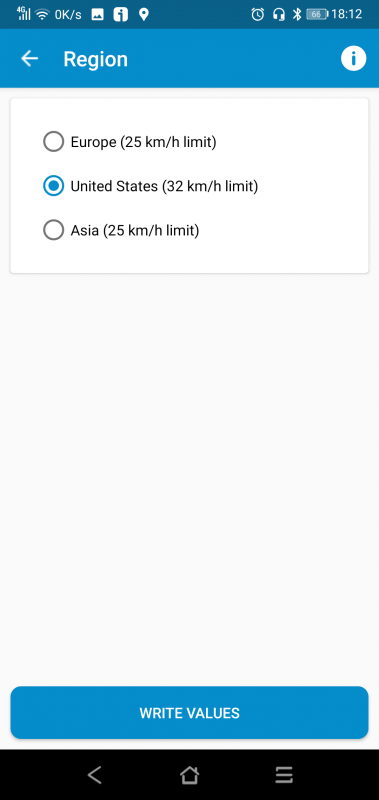
This method is usually preferable to modifying wheel circumference, because it keeps speed and distance readings correct.
Use this function only where local regulations allow it. In many European countries, an e-bike assisting above 25 km/h cannot legally be used on public roads.
Changing wheel circumference on Shimano EP8 / EP800
eTuning can also modify wheel circumference on compatible Shimano EP8 / EP800 motors.
This setting can be useful in two situations:
- when you want to configure speed assistance through the wheel value;
- when the motor has been installed on a bike with a different wheel size and the configured value does not match the real wheel.
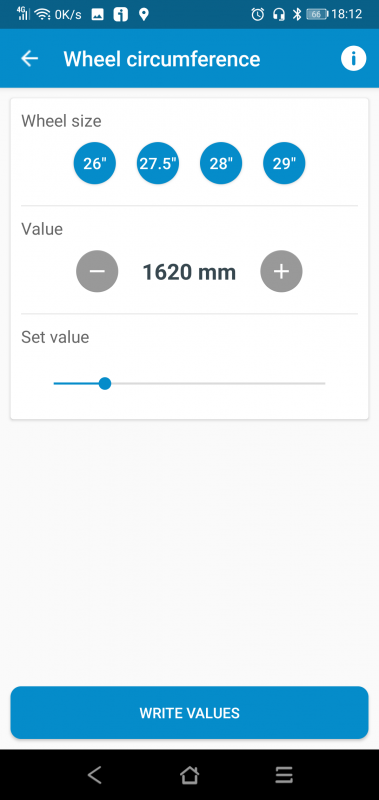
The disadvantage of this method is that the speedometer and odometer may stop showing real values if an artificial circumference is entered.
When available, the region setting lets you adapt the bike’s regional configuration to its country of use without changing wheel circumference.
A downgrade is no longer needed
With eTuning for Shimano EP8 / EP800, a downgrade is no longer needed.
eTuning detects the motor and directly shows the functions available for your bike.
How to use eTuning with Shimano EP8 / EP800
The general process is:
- Install eTuning on Android, iPhone or Windows.
- Connect the app to your bike.
- eTuning detects the Shimano EP8 / EP800 motor.
- The app shows compatible functions.
- Set the region for the country where the bike is used, adjust wheel circumference or apply another available setting.
- Check the configuration and use the bike according to applicable regulations.
The app identifies the system and shows the corresponding options. You do not need to know the exact firmware version in advance.
eTuning license for Shimano EP8 / EP800
The eTuning Premium license:
- costs 29.99 EUR + VAT;
- does not expire;
- is linked to the motor;
- can be used on Android, iPhone and desktop;
- does not depend on a single phone.
If you change phones, you can keep using the license with the same motor.
EP801 and EP6 do not use this guide
Shimano EP801, EP801-RS, EP6 and EP600 motors belong to a newer generation.
To adapt the bike’s regional configuration to its country of use, eTuning Pro supports region changes on EP801 and EP6 / EP600, along with wheel-circumference changes, over Bluetooth on Android or iPhone, without SM-PCE1 or SM-PCE02. With Plus, initial region and wheel settings require SM-PCE1 or SM-PCE02 and eTuning for Windows or Mac; you can then adjust maximum speed from your phone. Pro availability depends on the exact motor model.
If you have one of those motors, look for the specific EP801 / EP6 guide.
Legal note about changing assistance-speed settings on a Shimano e-bike
Changing speed assistance can change the legal classification of an electric bicycle.
In many countries, an e-bike that assists above 25 km/h cannot be used on public roads as a conventional electric bicycle.
Before changing the region, wheel circumference or any assistance limit, check the regulations in your country. The user is responsible for using the bike according to applicable law.
FAQ about Shimano EP8 / EP800
Are EP8 and EP800 the same?
Yes. In this guide we use EP8 and DU-EP800 to refer to the same Shimano STEPS motor family.
Does eTuning work with Shimano EP800-RS?
Yes. eTuning is always compatible with Shimano EP800-RS.
Is a downgrade needed?
No. With eTuning for EP8 / EP800, a downgrade is no longer needed.
Can I change the region to USA?
Yes, when your motor configuration allows it. The region setting lets you adapt the bike’s regional configuration to its country of use. With USA region, assistance can reach up to 32 km/h and the speedometer still shows real speed.
Can I change wheel circumference?
Yes. eTuning can modify wheel circumference on compatible EP8 / EP800 motors. Keep in mind this method may alter speed and distance readings.
Does the license work on several phones?
Yes. The license is linked to the motor, not the phone. You can use it with the same motor on Android, iPhone or Windows.
Does this guide apply to Shimano EP801 or EP6?
This guide covers EP8 / EP800. For EP801 and EP6 / EP600, see their dedicated guide.