
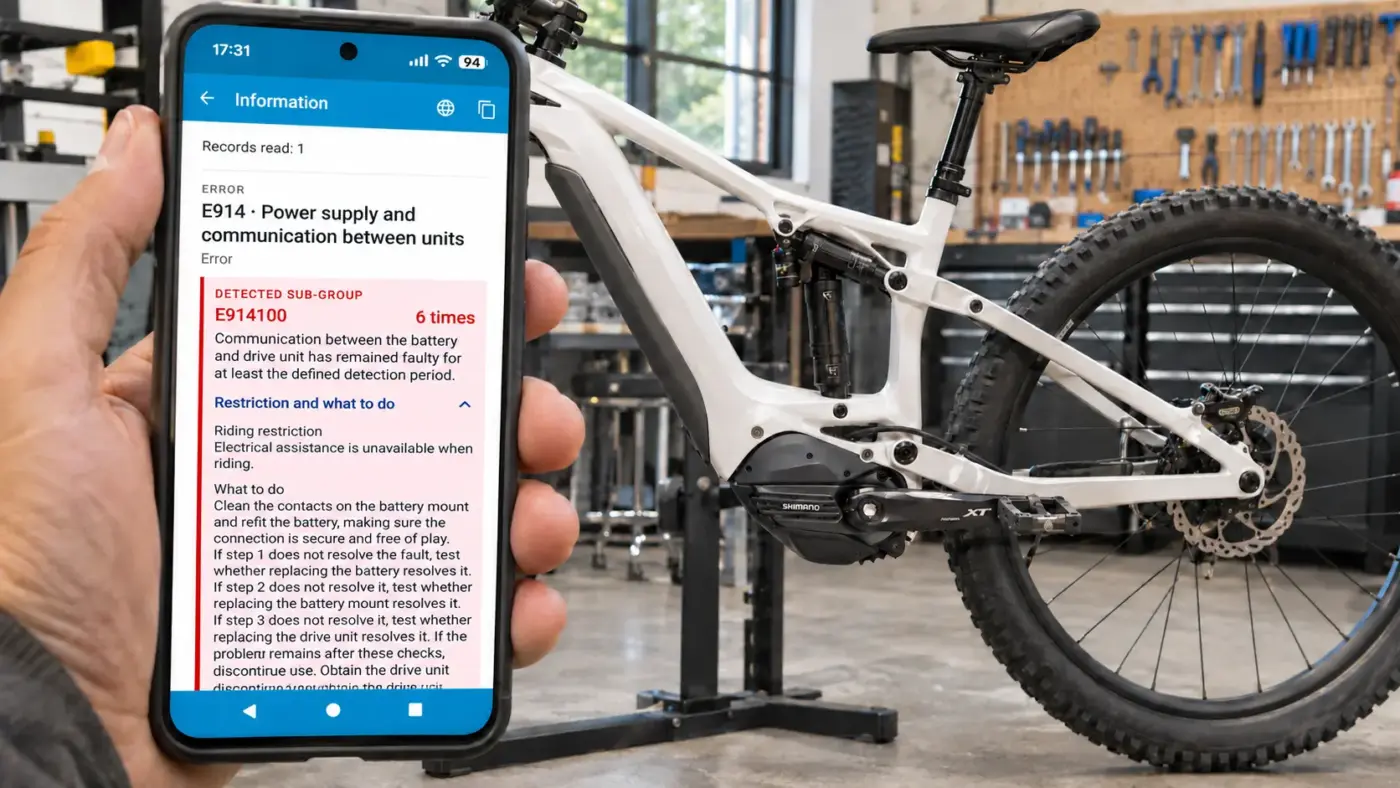
eTuning is the only app that shows error subcodes via Bluetooth for compatible EP801, EP6 / EP600 and EP5 / EP500 motors, directly on Android and iPhone. You do not need a workshop interface or a computer to view this detail.
A warning on your bike’s display can tell you that something is wrong, but it does not always explain what has happened. Different problems can lie behind the same general code. Now you can read the full code with eTuning and understand what the motor has recorded.
The general code does not tell the whole story
The bike’s display and standard readings may show an error such as E914 or E201. These codes group together issues in the same family: on their own, they do not always let you identify the specific cause.
The subcode adds that detail. For example, E914100 belongs to the E914 family but identifies a more specific issue. Shimano explains in its error and warning documentation that professional diagnostics classify errors in greater detail according to their cause, so those codes may differ from the ones shown on the display or in the mobile app.
eTuning does more than display a generic list of meanings: it reads the subcodes recorded in your motor via Bluetooth and shows an explanation for each one.
A real example: E914 and subcode E914100
The general error E914 indicates an abnormality between the battery and the motor. In eTuning, you can see which subgroup has been recorded:
- E914050: an abnormality in the power supply path between the units.
- E914100: a communication fault between the battery and the motor that has persisted throughout the specified detection interval.
In the screenshot below, eTuning identifies E914100 and shows that it has been recorded six times. The app explains the communication problem, its effect on assistance and the corresponding checks.
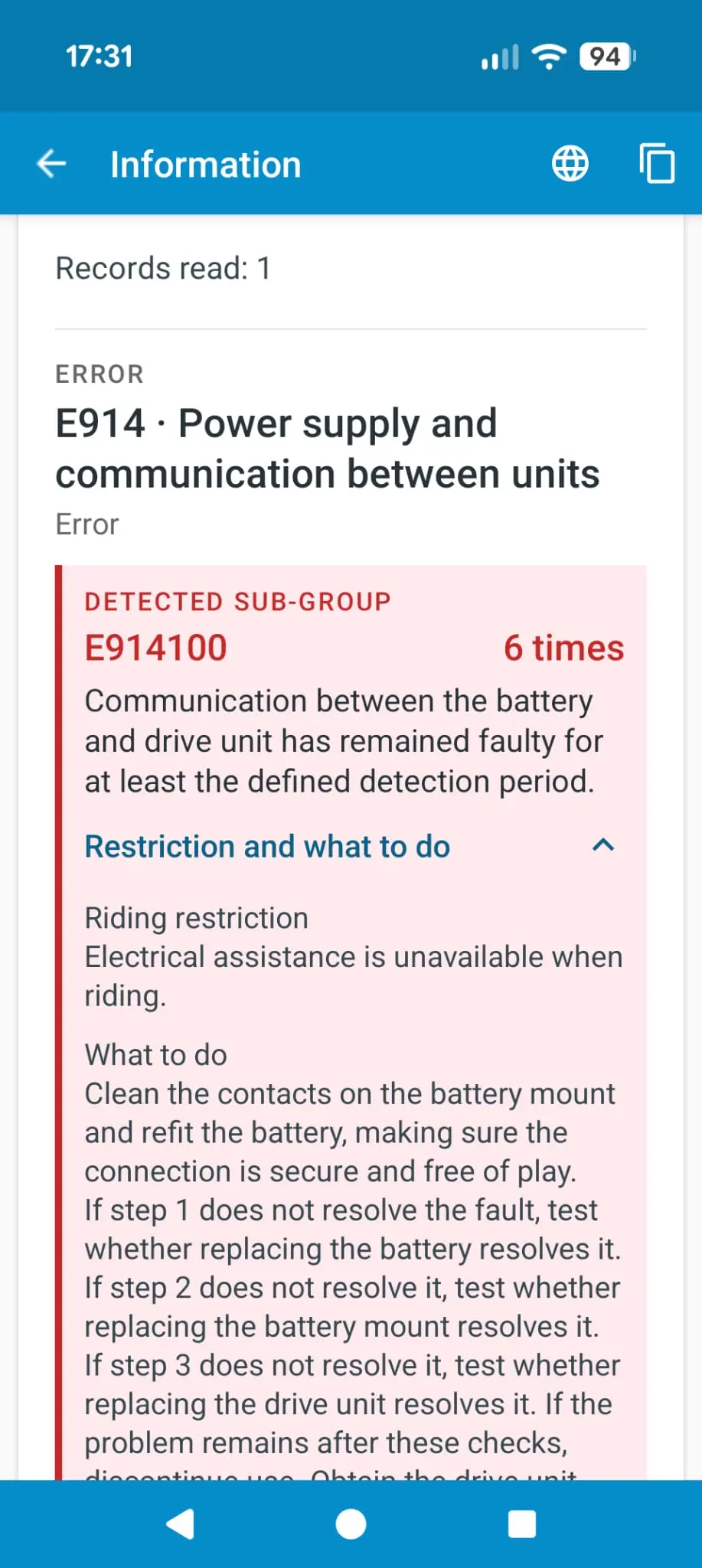
So, instead of simply knowing that “there is a problem between the battery and the motor”, you can check what type of issue the system has detected and how many times it appears in the history.
The same E201 code can indicate different problems
With E201, the difference is even clearer. The general description indicates that an abnormality has been detected in the drive unit, but this family contains ten subcodes in eTuning’s catalogue. These include:
- E201163: an abnormality in the torque sensor, which relates to the effort you apply when pedalling.
- E201180: a communication fault between the torque sensor and the motor’s internal controller.
- E201200: an abnormality in the cadence sensor, which relates to the rotation of the pedals.
A sensor abnormality is not the same as a fault in its internal communication. Although they may all appear as E201 on the display, the subcode lets you tell them apart and provides much more specific information when inspecting the bike or explaining the problem to a workshop.
Detailed diagnostics, now on your phone
This level of information is usually accessed using workshop tools, such as E-TUBE PROJECT Professional and a Shimano SM-PCE02 interface. With eTuning, you can access these subcodes from your phone via Bluetooth, without connecting a wired interface to read them.
In addition to the full code, you can check:
- What the system has detected: a specific description of the subcode.
- How many times it appears: the occurrences recorded in the history.
- How it affects operation: the restrictions associated with the error or warning.
- What to check: the instructions for that particular case.
History entries may relate to previous issues: a stored error does not mean it is still active. Viewing the details helps you understand it; doing so does not, by itself, clear or repair a fault.
Available on Android and iPhone for EP801, EP6 and EP5
Reading subcodes via Bluetooth is available in eTuning for Android and iPhone, with compatible EP801, EP6 / EP600 and EP5 / EP500 motors. Connect your bike to the app and check errors and their details, without needing a computer or an SM-PCE02 interface for this check.
To learn what the most common warnings mean as well, see our Shimano STEPS error guide.
The general warning tells you that something has happened. eTuning lets you see the detail behind it.