
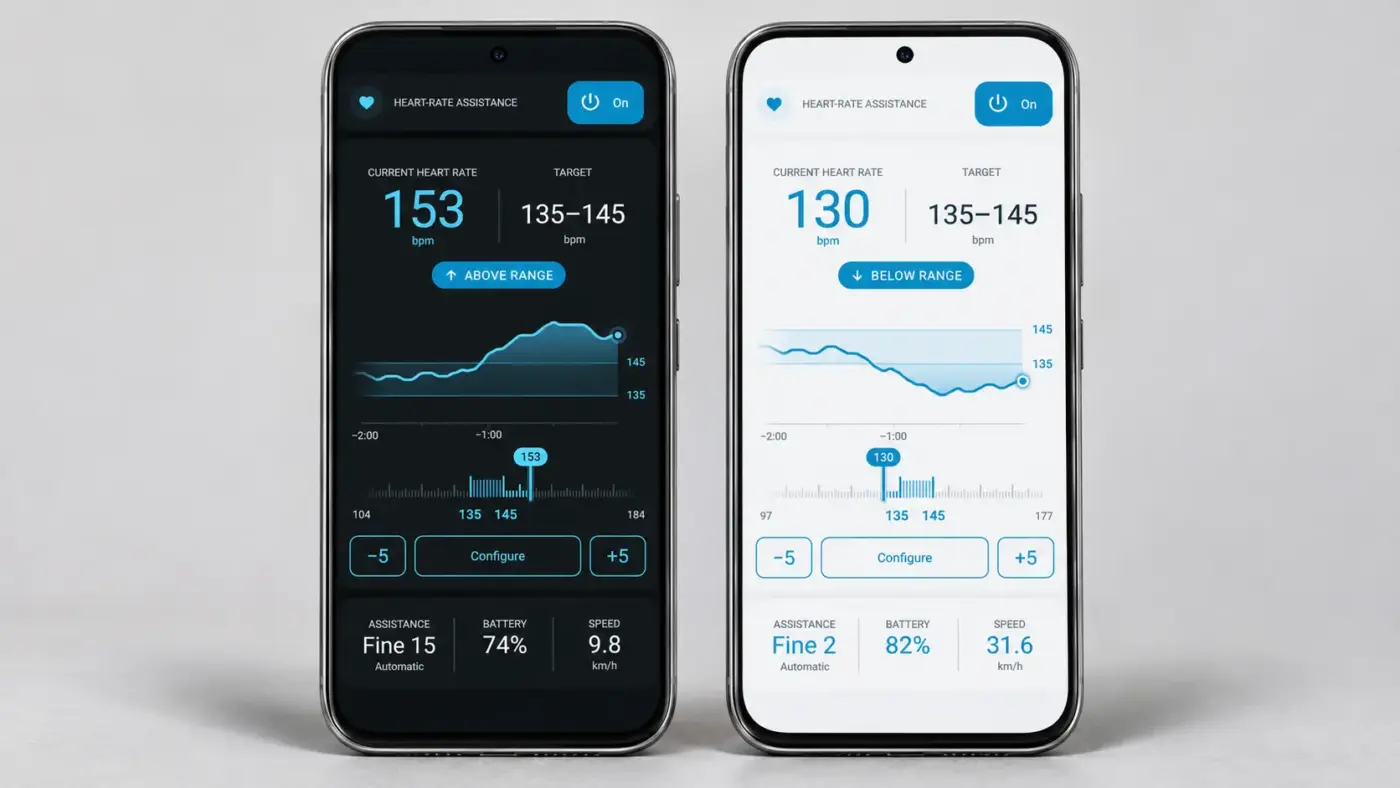
eTuning’s heart rate assistance automatically adjusts motor support based on your heart rate. It is a new Ride mode feature, currently in Beta, for bikes with compatible Shimano EP6 / EP600 and EP801 motors.
Connect a heart rate strap or a smartwatch that shares heart rate via Bluetooth, choose the heart rate you want to ride at and let eTuning increase or decrease the assistance for you. The screen is available in light mode and dark mode. You pedal; eTuning adapts the support.
Your heart rate sets the target; eTuning adjusts the assistance
Until now, you were the one changing modes when the climb got tough. With heart rate assistance, you choose a heart rate target and the automatic control adapts motor support to help you get closer to it:
- Above the range: increases assistance to help you reduce your effort.
- Below the range: reduces assistance so that you contribute more pedalling effort.
- Within the range: maintains the assistance level.
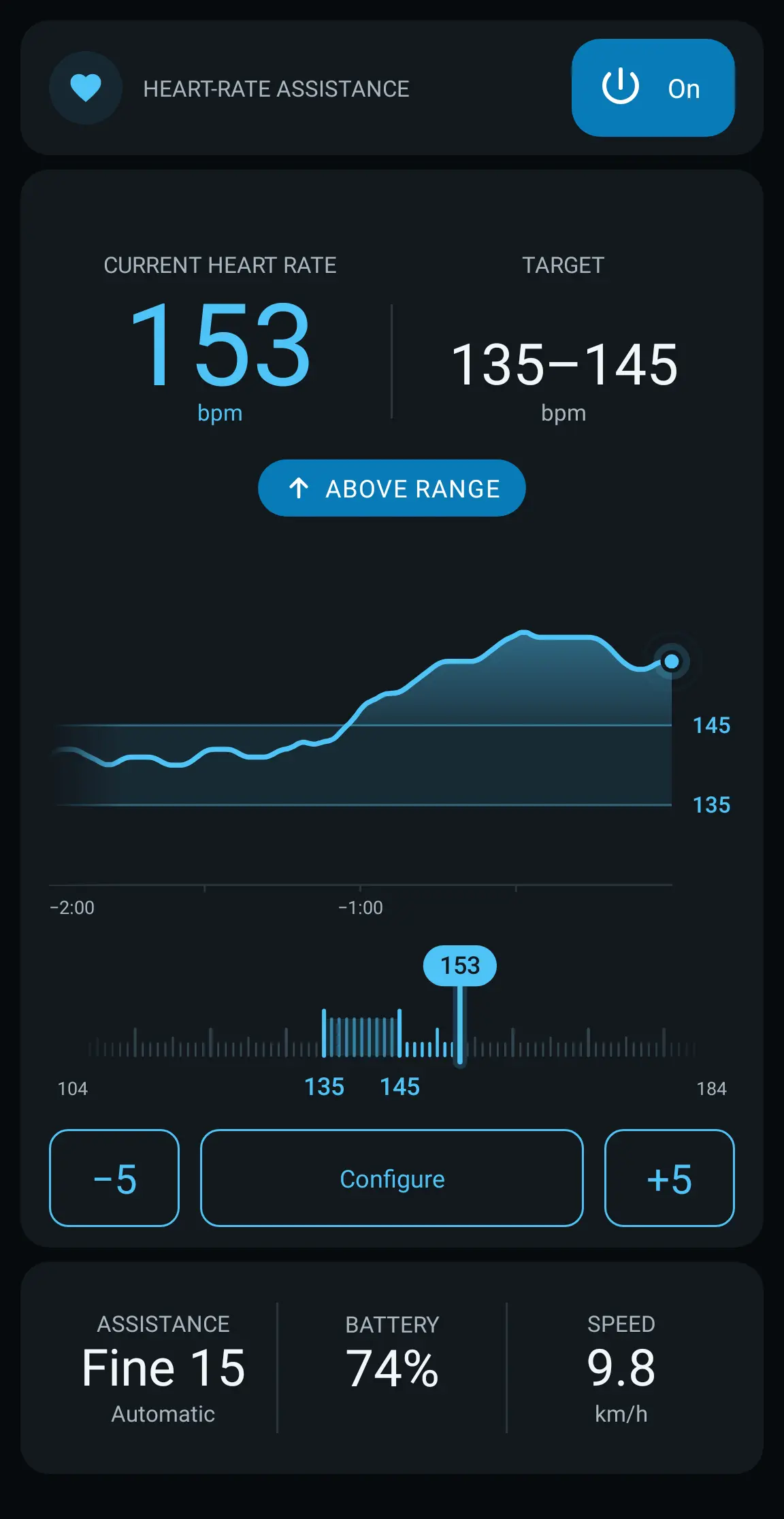
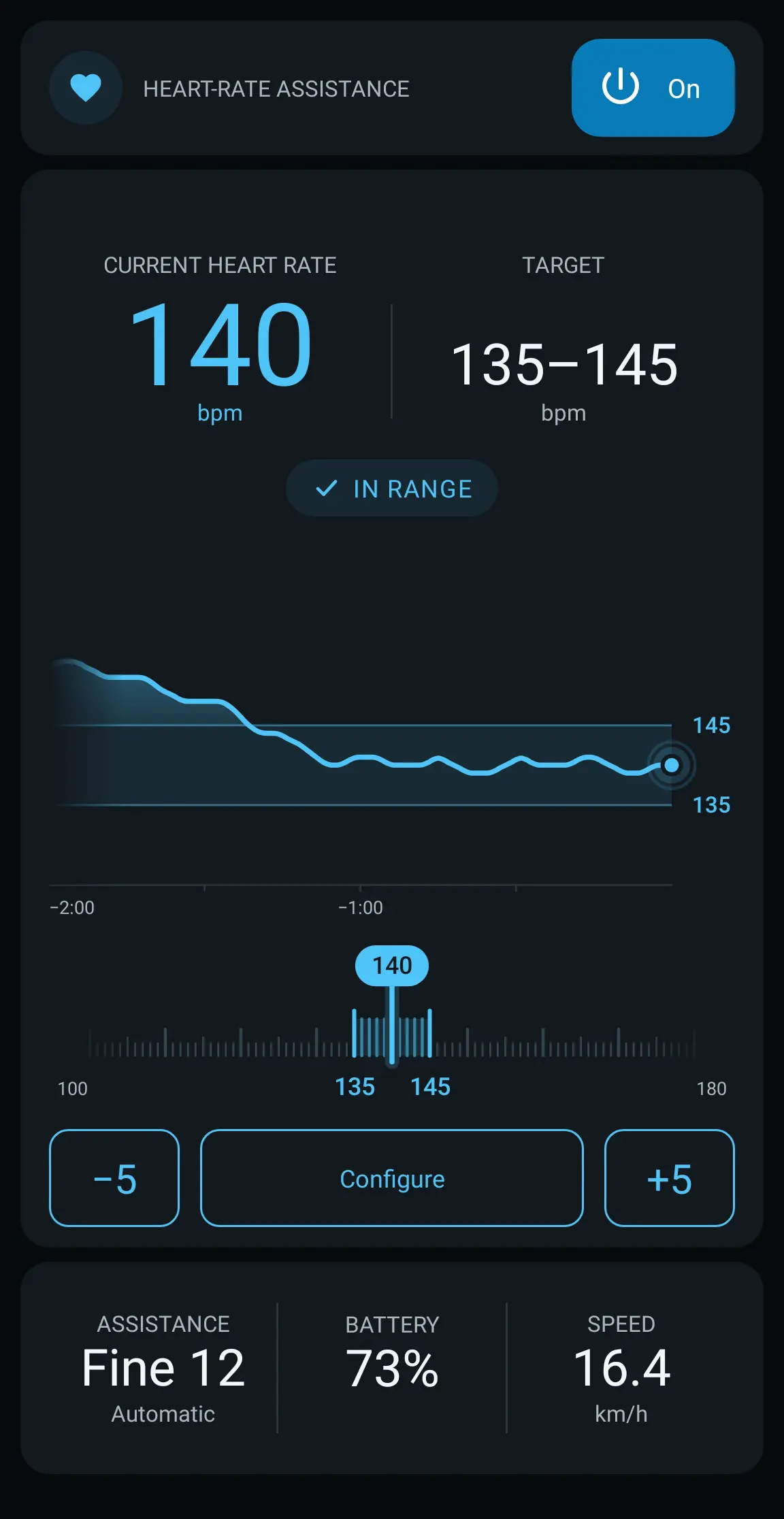
In these dark mode screenshots, the target is set to 135–145 beats per minute (bpm). The heart rate is shown above the range and then back within it. This is an example configuration, not a training recommendation.
How it works with a Bluetooth heart rate monitor or smartwatch
With the bike connected to eTuning in Ride mode, connect a heart rate monitor or watch that broadcasts heart rate via Bluetooth, set your target and enable heart rate assistance. From then on, the app continuously reads your heart rate and adjusts assistance across the 15 Fine Tune levels, within the limits you have configured.
This is not a fixed table that always assigns the same level to each heart rate value: the control adapts to how your response develops during the ride and adjusts motor support accordingly.
Two ways to set your target
Target range
The most straightforward option: set a minimum and maximum heart rate, and eTuning adjusts assistance to help you ride within that range. You can use it to maintain your chosen target during an endurance ride or on a route with changing gradients.
To change the target during the ride, the −5 / +5 buttons shift it instantly, without having to open the full settings.
Phased training
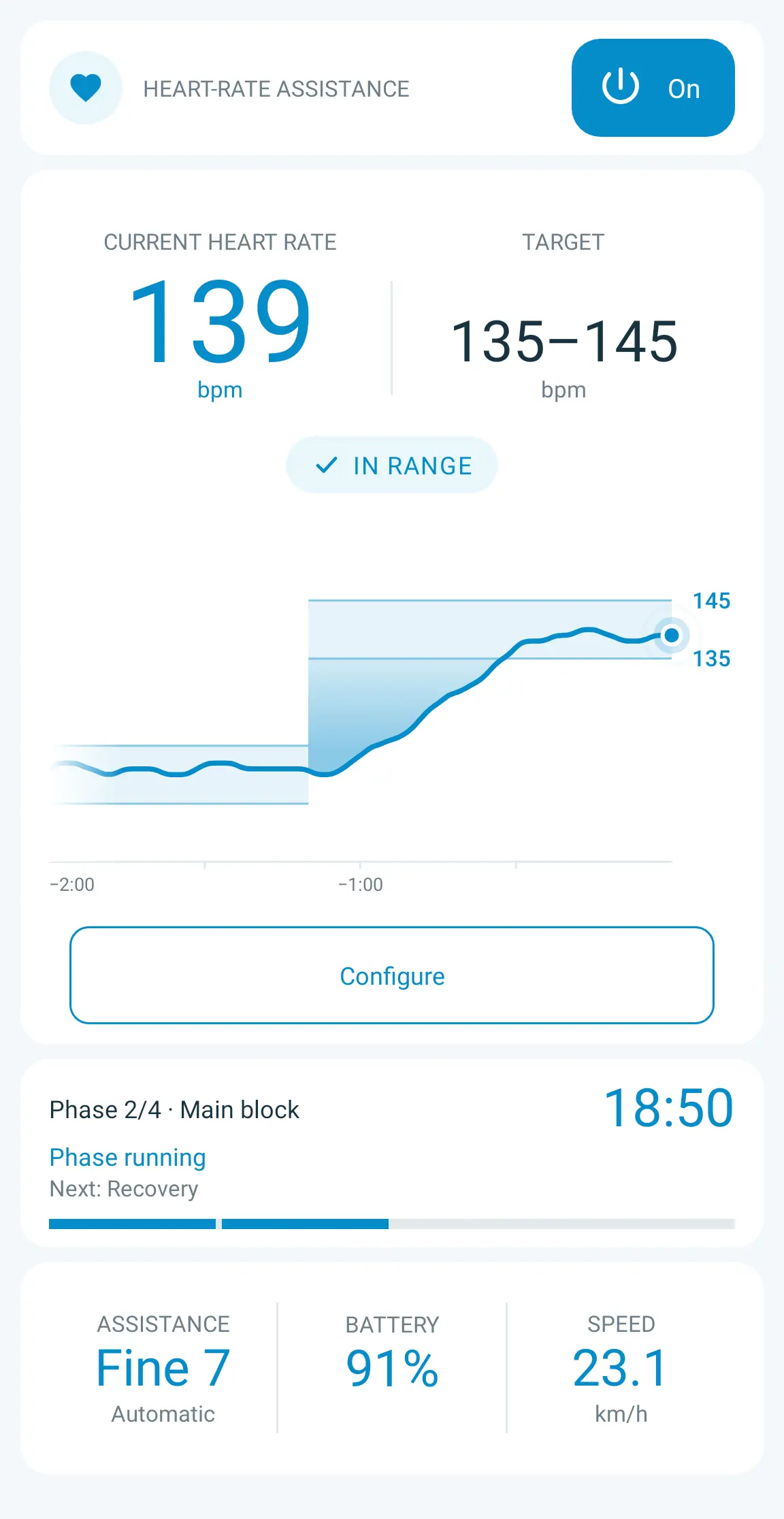
You can also structure the session into phases, such as warm-up, main block, recovery and cool-down. Each phase has its own duration and target. Ride automatically moves from one phase to the next and displays the current block, the remaining time and what comes next.
- Range: the aim is to stay between two heart rate values.
- Limit: the aim is not to exceed a heart rate value.
- Free: there is no heart rate target for the phase; you control the assistance.
You can also set a global heart rate limit for all phases. If you exceed it, assistance gradually increases and this limit takes priority over the current phase’s target.
Customise the response and assistance limits
- Control response: choose Gentle for gradual changes, Balanced for an intermediate response or Instant for a faster response to heart rate changes.
- Minimum and maximum assistance: choose which levels the automatic control can use. You can lower the maximum or raise the minimum to adapt the support to your preferences.
- Allow assistance OFF: if you enable this option, the control can turn motor support off completely when your heart rate is below the range.
- Handlebar switch priority: you can change assistance manually as usual. Heart rate control waits for your chosen period before taking over again.
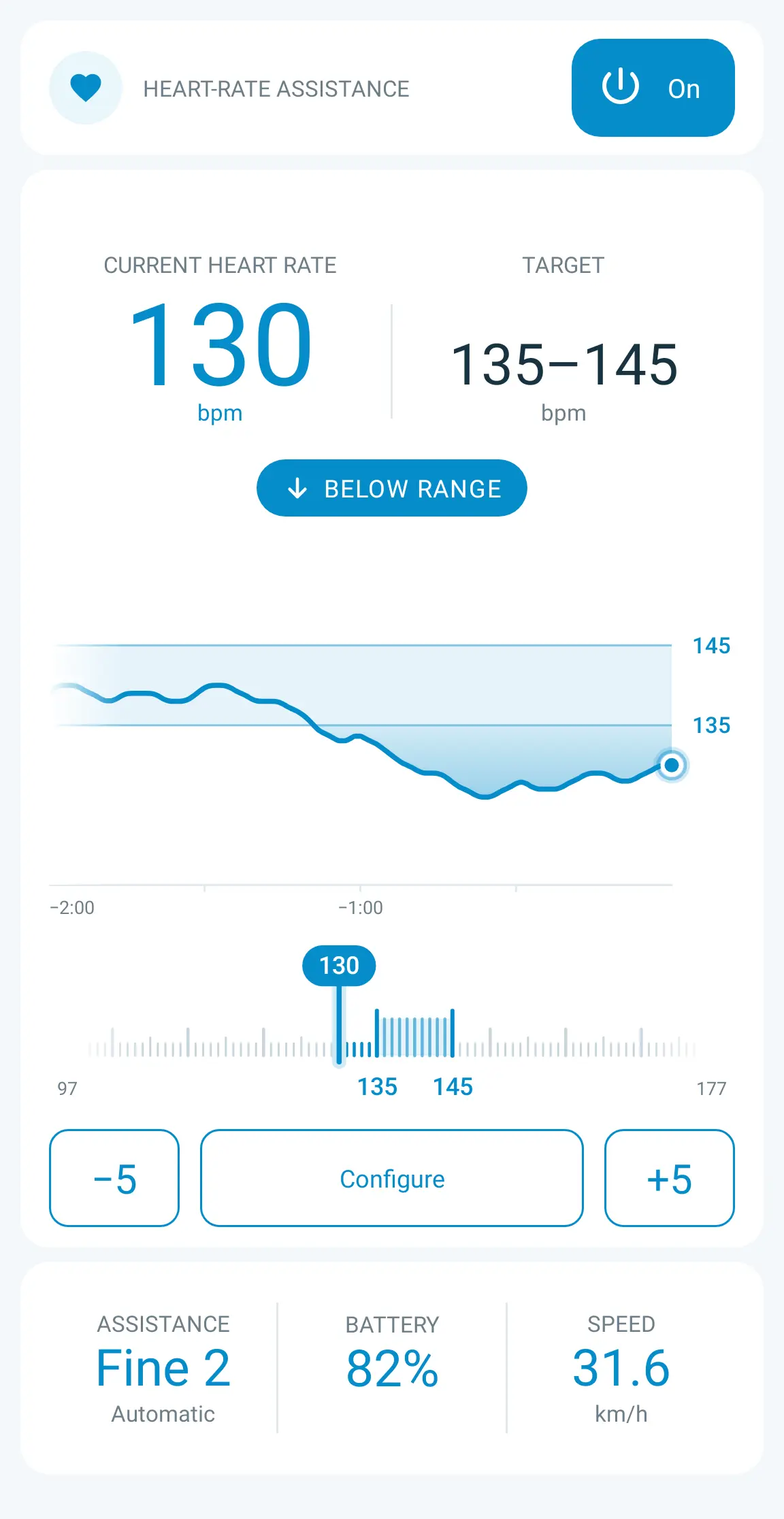
Light mode and dark mode: all your information at a glance
You can use heart rate assistance in both light mode and dark mode. Both show the same data and controls; only the visual presentation changes, not how the assistance works.
- Your heart rate and target, shown prominently.
- Heart rate status: within, above or below the range.
- Graph of the last two minutes: the target band lets you see how your heart rate is developing in relation to the configured range.
- Scale with indicator: shows your current position relative to the target.
- Current assistance, battery and speed.
What you need to use it with Shimano EP6 and EP801
- An e-bike with a compatible Shimano EP6 / EP600 or EP801 motor.
- eTuning in Ride mode, connected to the bike.
- A chest strap or smartwatch that broadcasts heart rate via Bluetooth. It is not enough for the watch to measure heart rate or have Bluetooth: it must be able to share heart rate with other apps. Devices that only broadcast via ANT+ are not compatible with this feature.
- The active profile set to Fine Tune with all 15 levels enabled. A gradual progression is recommended, starting with level 1 close to the minimum and increasing assistance little by little between levels: the more even this progression, the more precisely the control can work.
Smartwatches that share heart rate via Bluetooth
You can also use your watch’s heart rate readings, without a chest strap. Here are ten examples with a Bluetooth heart rate broadcasting feature documented by their manufacturers:
- Google Pixel Watch 5.
- Garmin fēnix 8.
- Garmin Forerunner 965.
- Garmin Venu 3.
- Polar Vantage V3.
- Polar Pacer Pro.
- Polar Grit X2 Pro.
- Suunto Race 2.
- Suunto Race S.
- Suunto Vertical 2.
Keep your watch up to date, enable its option to share or broadcast heart rate and select it as a heart rate monitor in eTuning. Some models only broadcast while an activity is running. This list is not exhaustive: other watches may also work if they broadcast heart rate using the standard Bluetooth heart rate profile.
On Pixel Watch, open Connected Fitness in Quick Settings and tap Connect. If that shortcut is not shown, you will find the feature under Settings → Connectivity → Share heart rate. Follow the watch’s instructions to complete pairing.
Frequently asked questions
Do I need to keep my phone screen on?
No. The control keeps working with the phone locked.
What happens if the heart rate monitor loses its signal?
Ride notifies you and assistance stays at its current level. When heart rate data is received again, the control resumes automatically.
Can I turn off heart rate assistance during a ride?
Yes. You can turn it off at any time using the same button you use to turn it on.
Can I change the settings without ending the ride?
Yes. In range mode, you can shift the target with −5 / +5. The other settings are available under Configure.
A new way to ride with eTuning Ride
Heart rate assistance is launching in Beta: try it and tell us what you think. Choose your target and let eTuning adjust the support while you pedal.
To learn about the other riding data and features, see our article on eTuning Ride and rider and motor telemetry.