
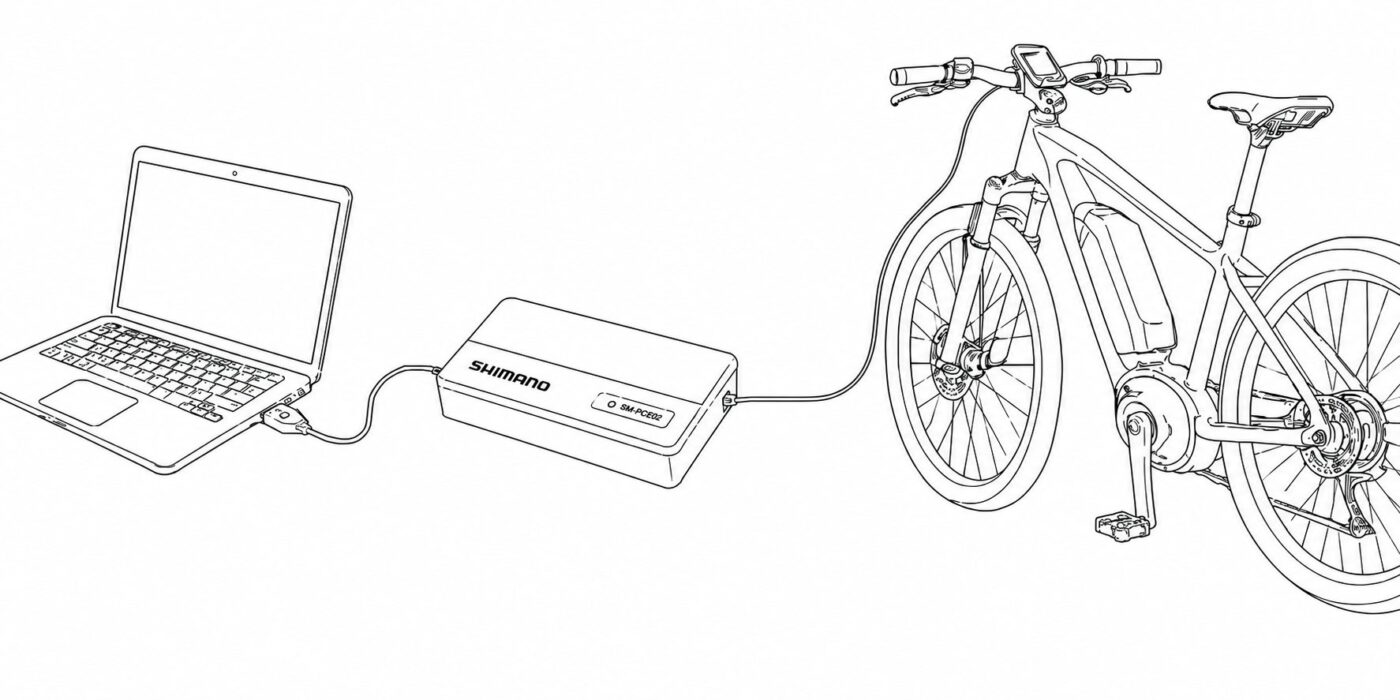
Some Shimano STEPS motors require a Shimano SM-PCE1 or SM-PCE02 interface for certain configurations with eTuning for Windows or Mac. However, not every user wants to buy an interface for a single use.
That is why we are introducing eTuning Local Help, a feature that helps you find nearby individuals and professionals who have an SM-PCE1 or SM-PCE02 and offer in-person assistance.
If you are looking to rent or borrow a Shimano SM-PCE1 or SM-PCE02 interface, or find a workshop that has one, Local Help lets you locate someone nearby who can carry out the connection and configuration with you in person.
What the Shimano SM-PCE1 or SM-PCE02 interface is used for
The SM-PCE1 or SM-PCE02 connects a Windows PC or Mac to the bicycle or Shimano STEPS motor. With eTuning, it can change compatible parameters on certain bicycles and perform configurations that are not available over Bluetooth.
It is also an important tool when a system problem occurs: it can be used to recover the bicycle or restore the firmware of the motor and other compatible components.
The interface is used only during the connection. It is not installed permanently or tied to one bicycle, so the same SM-PCE1 or SM-PCE02 can help different users.
What eTuning Local Help is
Local Help is a private directory built into the eTuning apps. Its purpose is to connect users who need an SM-PCE1 or SM-PCE02 interface with individuals or professionals who already have one.
The assistance is in person. The user contacts the selected provider and both parties agree directly where to connect the bicycle and what help is required.
The directory includes private owners, experienced users, professionals and workshops. Some offer help free of charge, some specify a price, and others prefer to agree the terms directly with the interested user.
How to find an SM-PCE1 or SM-PCE02 interface near you
Local Help will become progressively available in eTuning for Android and iPhone over the coming weeks.
- Connect your bicycle with eTuning for Android or iPhone.
- Open the Local Help section.
- View the profiles available in your country.
- Review their location and stated terms.
- Contact the selected individual or professional directly.
- Arrange an appointment to connect the bicycle with the interface in person.
Availability may vary by country, locality and installed eTuning version. The map on this page gives a general view of active profiles, while contact details are shown only inside the app.
Why a licence is required to view contact details
A valid eTuning licence linked to the motor is required to access contact details. This requirement protects the privacy of people offering help.
Names, phone numbers, email addresses and addresses are not published openly on the website or shown on the map. They can be viewed only by eTuning users with a valid licence and a motor connected at that moment.
This reduces the risk of automated collection, bulk extraction or misuse of the personal data of people participating in Local Help.
Do you have an SM-PCE1 or SM-PCE02? Offer local help
Individuals and professionals who own an interface can offer in-person help to other users in their area.
To create a profile, you must use eTuning for Windows or eTuning for Mac, be connected to the bicycle and have the interface connected.
- State whether you are an individual or a professional.
- Add your country, locality and contact details.
- Indicate whether the help is free, has a fixed price or requires an enquiry.
- Edit your details whenever necessary.
- Temporarily pause your profile when unavailable.
- Remove your offer when you no longer want to appear in the directory.
A profile can be created, edited, paused or removed only from eTuning for Windows or Mac while the interface is connected. It cannot be published from the website or mobile apps.
An alternative to buying an interface for one use
The SM-PCE1 or SM-PCE02 can be used with different bicycles and is disconnected when the work is complete. Someone who already owns the interface can therefore help other users in person without each user having to buy one for a single configuration.
Local Help does not manage payments or set service terms. Each individual or professional explains the help they offer and agrees the details directly with the interested user.
Frequently asked questions
Where can I find a Shimano SM-PCE1 or SM-PCE02 interface?
You can view available profiles in the Local Help section of eTuning for Android or iPhone. The map on this page shows general availability without publishing personal data.
Is the help provided in person?
Yes. Local Help is designed to find a nearby individual or professional and carry out the connection and configuration in person.
Is help with an SM-PCE1 or SM-PCE02 free?
It depends on the profile. Some users offer help free of charge, while others state a price or terms that must be discussed directly.
Do I need a licence to view contact details?
Yes. A valid eTuning licence and a motor connected at that moment are required to protect providers’ personal data and prevent the directory from being collected publicly.
Can I offer help as a private individual?
Yes. Local Help is open to individuals, professionals and workshops.
How can I publish or remove my profile?
Connect the SM-PCE1 or SM-PCE02 and use eTuning for Windows or Mac. From the desktop app you can create, edit, pause or remove your profile.
Find in-person help with an SM-PCE1 or SM-PCE02
If you need a Shimano SM-PCE1 or SM-PCE02 interface to configure or recover a compatible bicycle, Local Help lets you check whether an individual or professional is available near you.
If you already own an interface, you can use eTuning for Windows or Mac to offer in-person help to other users in your area.