
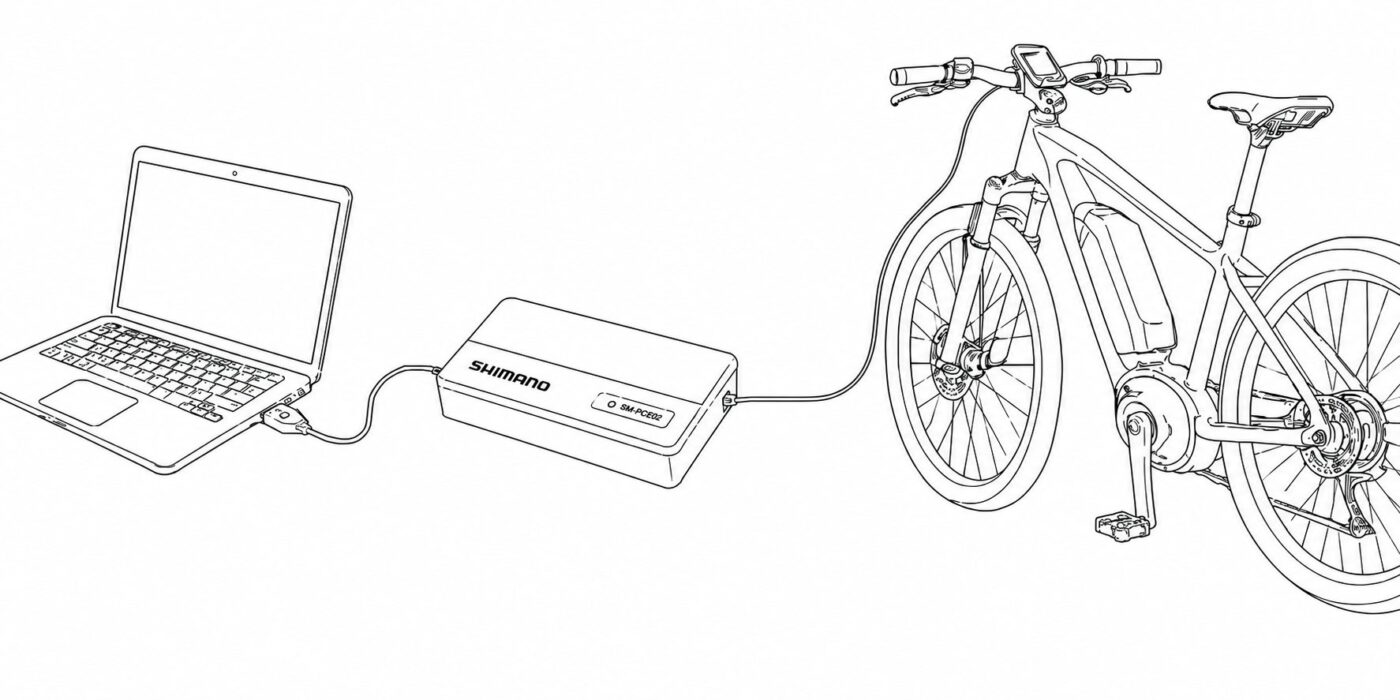
The SM-PCE1 or SM-PCE02 connects to a Windows PC by USB and acts as the communication interface between eTuning and the Shimano STEPS bike or motor. It is not installed permanently on the bike.
You can buy it new, buy it used, borrow one, use a workshop interface, or resell it later if you only need it for one configuration session.
This page is for users who already know that their eTuning setup requires eTuning for desktop and a Shimano SM-PCE1 or SM-PCE02 interface.
SM-PCE1 or SM-PCE02 buying options for eTuning for desktop
| Option | Best for | What to know |
|---|---|---|
| Buy new | Users who want the safest purchase | New product, clear contents, warranty and lower risk |
| Buy used | Users who want to reduce the real cost | The interface is not locked to one bike and can usually be sold again after use |
| Borrow or local help | Users who only need the interface once | A workshop or another user may already have one. Use eTuning Local Help to find in-person help near you. |
Which Shimano interface do I need for eTuning for desktop?
The required interface is the Shimano SM-PCE1 or SM-PCE02. Make sure you are buying the complete SM-PCE1 or SM-PCE02 interface, not only a replacement cable, PC link cable or small adapter. The interface itself is the main box that connects to the computer by USB.
Where to buy an SM-PCE1 or SM-PCE02 interface
The links below are examples to help you find the correct product. Availability, price, shipping and included contents can change at any time. eTuning does not sell these interfaces and is not responsible for third-party stores.
Where to buy a new Shimano SM-PCE1 or SM-PCE02 interface in Europe
| Store | Region | Link |
|---|---|---|
| Bike-Components | Germany / Europe | Open Bike-Components |
| Bike-Discount | Germany / Europe | Open Bike-Discount |
| BIKE24 | Germany / Europe | Open BIKE24 |
| Gamba Cicli | Italy / Europe | Open Gamba Cicli |
| Bicimarket | Spain | Open Bicimarket |
International stores and marketplace searches for SM-PCE1 or SM-PCE02
| Store | Region | Link |
|---|---|---|
| Universal Cycles | USA / worldwide | Open Universal Cycles |
| Merlin Cycles | UK / worldwide | Open Merlin Cycles |
| Amazon | Marketplace | Search Amazon |
Buying a used Shimano SM-PCE1 or SM-PCE02 interface
A used SM-PCE1 or SM-PCE02 can be a good option if you only need the interface for a short configuration session. The hardware is not locked to one bike, so many users can resell it later and reduce the real cost.
| Search | Best for | Link |
|---|---|---|
| eBay Germany | German and EU users looking for used units | Search eBay.de |
| eBay international | Broader global listings | Search eBay.com |
| eBay UK | UK users or buyers importing from UK sellers | Search eBay UK |
Can a workshop use one interface for multiple bikes?
Yes. The SM-PCE1 or SM-PCE02 interface is hardware used to connect the bike or motor to the Windows or Mac computer. It is not permanently paired with one bike.
The eTuning license is separate: it is linked to the motor being configured. A workshop can use the same SM-PCE1 or SM-PCE02 interface for different bikes, but each motor still needs its own valid eTuning license when paid functions are used.
Borrowing an SM-PCE1 or SM-PCE02 interface or getting local help
Some users may prefer not to buy the interface if they only need it once. A local bike shop or another e-bike user may already have a compatible interface.
eTuning Local Help lets you find nearby individuals, professionals and workshops that have an SM-PCE1 or SM-PCE02 and offer in-person help. Profiles are becoming progressively available in eTuning for Android and iPhone. Viewing contact details requires a valid eTuning licence and a motor connected at that moment.
Using the SM-PCE1 or SM-PCE02 with eTuning for desktop
When the compatibility tool says that your motor needs the Windows interface method, the general idea is simple:
| Step | Action |
|---|---|
| 1 | Install eTuning for desktop |
| 2 | Connect the SM-PCE1 or SM-PCE02 interface to the Windows PC by USB |
| 3 | Connect the interface to a free port on the bike, usually on the display or handlebar switch, using the connection cable included with the complete kit |
| 4 | Open eTuning and follow the connection method shown for your motor |
On a complete bike, the SM-PCE1 or SM-PCE02 is normally connected from the handlebar area: use a free port on the display or on the handlebar switch. If the motor is outside the bike or disconnected from the rest of the system, read the direct motor connection guide.
If you are not sure whether your motor needs mobile Bluetooth or Windows with SM-PCE1 or SM-PCE02, start with the eTuning compatibility tool.
Shimano SM-PCE1 or SM-PCE02 and eTuning for desktop FAQ
What is the Shimano SM-PCE1 or SM-PCE02?
The Shimano SM-PCE1 or SM-PCE02 is a PC linkage and diagnostic interface used to connect compatible Shimano Di2 and STEPS systems to a Windows or Mac computer through a USB connection.
Do I need an SM-PCE1 or SM-PCE02 for eTuning for desktop?
You need an SM-PCE1 or SM-PCE02 when your motor requires the eTuning for desktop interface method. eTuning shows this requirement in the compatibility result or inside the app.
Can I use eTuning for desktop without SM-PCE1 or SM-PCE02?
For Windows operations that require a Shimano interface, no. eTuning for desktop needs a compatible interface such as the Shimano SM-PCE1 or SM-PCE02 to communicate with the bike or motor.
Where do I connect the SM-PCE1 or SM-PCE02 on the bike?
On a complete bike, connect the SM-PCE1 or SM-PCE02 to a free port on the display or on the handlebar switch using the included connection cable. If the motor is isolated outside the bike, use the Direct Motor Connection method instead.
Can I buy a used SM-PCE1 or SM-PCE02?
Yes. A used SM-PCE1 or SM-PCE02 can work normally. The interface is not locked to one bike.
Can I resell the SM-PCE1 or SM-PCE02 after using it?
Yes. The SM-PCE1 or SM-PCE02 is not locked to one bike. If you only need it once, you may be able to resell it later, depending on your local second-hand market.
Do I need to buy extra cables?
No, not when you buy the SM-PCE1 or SM-PCE02 interface kit. The required USB and connection cables are normally included.
Is the SM-PCE1 or SM-PCE02 installed permanently on the bike?
No. The SM-PCE1 or SM-PCE02 is only used as a connection interface while configuring, diagnosing or preparing the bike or motor. It is disconnected after the work is done.
Can a bike shop use one SM-PCE1 or SM-PCE02 for many bikes?
Yes. A workshop can use the same SM-PCE1 or SM-PCE02 interface for multiple bikes. eTuning paid licenses are linked to each motor, not to the interface.
Where can I find local help with an SM-PCE1 or SM-PCE02?
eTuning Local Help lets you find nearby individuals, professionals and workshops that have an SM-PCE1 or SM-PCE02 and offer in-person help. Profiles are becoming progressively available in eTuning for Android and iPhone. Viewing contact details requires a valid eTuning licence and a motor connected at that moment.