Advanced motor configuration from your phone
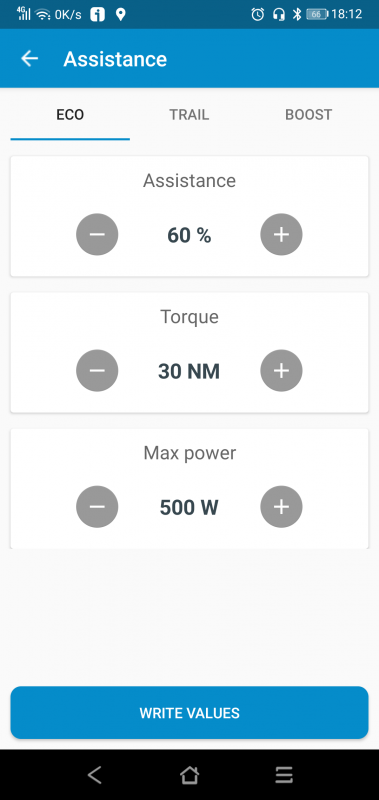
Adjust all advanced parameters your Shimano STEPS motor allows from mobile, including assistance modes, support behavior and compatible motor settings.



Everything Shimano STEPS riders need in one place.
Configure regional assistance settings, back up and sync your bike across Windows, Mac, Android and iPhone.
Helping Shimano STEPS riders since 2020

Taking your bike to another country? Select your motor to see how to adapt its regional configuration with eTuning.
Find your motor model in the eTuning app, on the Information screen.
This motor series lets you change region from your phone with eTuning Pro, or from Windows or Mac with eTuning Plus and a Shimano interface. The selected region determines the available assistance settings: USA Class 3 allows up to 45 km/h, keeping the real speed display and the original wheel circumference.
Choose a configuration suitable for the country and place where you will use your bike. Changing the region alone does not guarantee that the bike meets all requirements for use on public roads.
You can change region from Android or iPhone via Bluetooth, or from Windows or Mac with a Shimano interface, regardless of the installed firmware. The USA region allows assistance up to 32 km/h, keeping the real speed display.
Choose a configuration suitable for the country and place where you will use your bike. Changing the region alone does not guarantee that the bike meets all requirements for use on public roads.
eTuning configures compatible Shimano STEPS motors by software, without installing a tuning chip, permanent hardware or modified wiring on the bike.
Use eTuning to change your Shimano e-bike’s region and configure the corresponding maximum assistance speed, making it easy to adapt its settings to the requirements of each country. Select your motor above to see the compatible method.
Speed settings must be used in accordance with local laws. If a configuration exceeds public-road limits, use it only in private areas or where legally permitted.


Adjust all advanced parameters your Shimano STEPS motor allows from mobile, including assistance modes, support behavior and compatible motor settings.
Save and restore complete bike configurations across your devices.


Cloud backups configured in eTuning for desktop and restored from the mobile app.
One-time permanent payment for one specific motor. The license remains linked to the purchased motor.
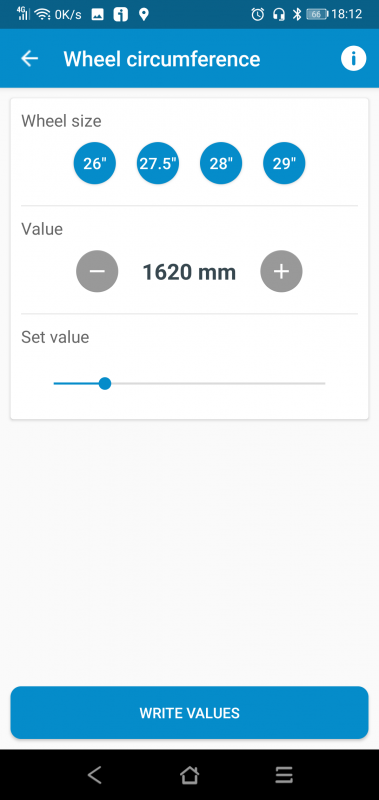
Allows you to modify the functions compatible with your motor: maximum speed, region or wheel size, depending on model and connection method.
Save up to 5 complete bike configuration backups. You can use them as presets or as a safety backup.
With one license for this motor you can use eTuning Premium on desktop, Android and iPhone at the same time.
Some advanced functions and quick access tools may be available depending on the motor, the platform used and the connection method.
The license is detected when the motor is connected, even if you reinstall the app.
One motor license works on all your devices.
It does not expire and remains linked to the purchased motor.
News and mini guides about eTuning and Shimano STEPS.